
Function Jog Board (Control Joystick) for Samsung Monitor LC24F390FHA/XXA – BN96-39758A

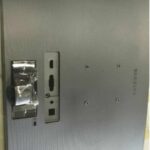
Genuine Samsung function jog board, part number BN96-39758A, for the Samsung LC24F390FHA/XXA 24-inch curved monitor (versions FC03, FJ18 and FU12). It is the small control board with the joystick-style button that switches the monitor on and moves through the on-screen menu. Replace it if the button is stuck, loose or no longer responds.

  • Part number: BN96-39758A
  • Fits: Samsung LC24F390FHA/XXA
  • Fixes: monitor joystick or button stuck or loose, monitor not switching on or off with the button, on-screen menu not opening, menu jumping about by itself
  • Genuine Samsung part, delivered anywhere in South Africa. Faulty parts are covered for 6 months from delivery under the Consumer Protection Act.

BN96-39758A ASSY BOARD P-FUNCTION JOG CF390_CF770 BL

FOR SAMSUNG LC24F390FHA/XXA 24″ MONITOR (Ver: FC03/FJ18/FU12)

SKU: BN96-39758A

R119,00

Cant Find What You Need?

WhatsApp us to enquire 

WhatsApp Now

Payment Methods:

Description

Samsung 24-inch Curved Monitor Function Jog Board BN96-39758A

The function jog board, part number BN96-39758A, is the small control board of the Samsung LC24F390FHA/XXA 24-inch curved monitor. A jog is a joystick-style button: you press it to switch the monitor on or off and move it to go through the on-screen menu. Samsung lists it as a black function jog board with the platform code CF390_CF770, for versions FC03, FJ18 and FU12. It is also known as the joystick board, control button board or menu button board. This is a genuine Samsung part.

What does the function jog board do?

The board carries the jog switch and sends its signals to the main board through a short cable. This is how you power the monitor, open the menu and change the brightness, input source and picture settings without a remote. The switch is used every day, so it can wear out or stick, and its small solder joints can crack if the monitor is knocked or the button is pushed hard.

The board carries only the switch and its wiring, so it is a small and simple part. It is listed for all three versions of this monitor, so there is no version code to match. The main board that receives the button presses is a separate part and does differ by version.

Signs your Samsung monitor jog board needs replacing

  • The joystick or button is stuck, loose or wobbles
  • Pressing it does not switch the monitor on or off
  • The on-screen menu does not open, or one direction does not work
  • The menu opens or jumps about by itself, which points to a stuck switch
  • The monitor keeps switching itself on and off

Rule these out first: a faulty power adapter, a loose power cable or the wrong input source can look like a dead control button. If the monitor powers up but shows no picture, the main board is the more likely cause.

Compatible Samsung Monitor models

Samsung model numberType
LC24F390FHA/XXA (LC24F390FHA)24-inch curved monitor

Not sure which model you have? The model number is on the label on the back of the monitor. If your model is not listed, send us the model number and we will check whether this part fits before you order.

Specifications

Part numberBN96-39758A
Part typeFunction jog board (control joystick and button board)
Also known asJoystick board, control button board, menu button board, OSD control board
Samsung descriptionASSY BOARD P-FUNCTION JOG; CF390_CF770, BL
ColourBlack
Samsung platform codeCF390_CF770
Monitor versionsFC03, FJ18 and FU12
Used inSamsung 24-inch curved monitors
ConditionNew, genuine Samsung (OEM) part
WarrantyFaulty parts are covered for 6 months from delivery under the Consumer Protection Act

Frequently asked questions

Will BN96-39758A fit my Samsung LC24F390FHA/XXA?

Yes. It is listed for the LC24F390FHA/XXA 24-inch curved monitor, versions FC03, FJ18 and FU12. For any other model or version, send us the model number and we will confirm.

What is a function jog on a monitor?

It is the joystick-style control button. Pressing it switches the monitor on or off, and moving it up, down, left or right navigates the on-screen menu.

My monitor menu opens by itself. Is the jog board faulty?

It can be. A stuck or worn switch on the jog board sends a button press all the time. If the fault stays after the monitor is switched off and on again, the board is the likely cause.

Why buy Samsung spare parts from us?

  • Samsung authorised parts and repair centre
  • Genuine Samsung parts. Faulty parts are covered for 6 months from delivery under the Consumer Protection Act, and we pay the courier to send them back to us. How to return a part
  • Nationwide delivery across South Africa, including Johannesburg, Pretoria, Cape Town, Durban, Gqeberha and Bloemfontein
  • Samsung repair centres in Umhlanga, KwaZulu-Natal, and Pretoria, Gauteng