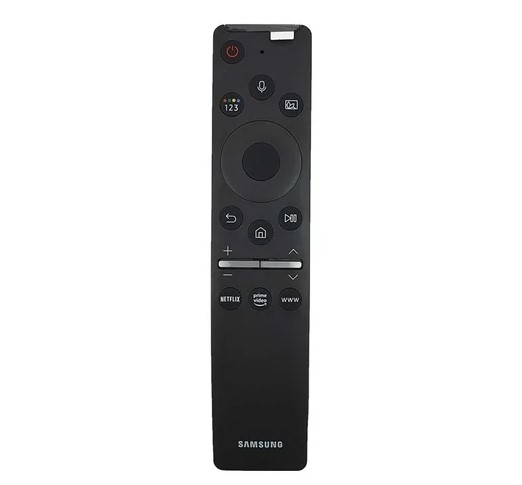

Smart Remote Control for Samsung TV QA65Q60TAKXXA – BN59-01330C

Genuine Samsung smart remote control, part number BN59-01330C, for the Samsung QA65Q60TAKXXA 65-inch QLED 4K TV (versions AA02 and CA01). It is the smart remote Samsung lists for its 2020 TVs, used to switch the TV on and off and to control volume, channels, apps and menus. Replace it if the remote is lost, broken, or no longer controls the TV.

  • Part number: BN59-01330C
  • Fits: Samsung QA65Q60TAKXXA
  • Fixes: TV not responding to the remote, remote buttons not working, lost or broken remote, remote switching the TV on and off but nothing else
  • Genuine Samsung part, delivered anywhere in South Africa. Faulty parts are covered for 6 months from delivery under the Consumer Protection Act.

BN59-01330C REMOCON-SMART CONTROL 2020 TV SAMSUNG 21 QA65Q60TAKXXA Ver: (AA02 / CA01)

SKU: BN59-01330C

R950,00

Cant Find What You Need?

WhatsApp us to enquire 

WhatsApp Now

Payment Methods:

Description

Samsung QLED TV Smart Remote Control BN59-01330C for the QA65Q60TAKXXA

The smart remote control, part number BN59-01330C, is the hand-held remote listed for the Samsung QA65Q60TAKXXA 65-inch QLED 4K TV, versions AA02 and CA01. Samsung describes it as a smart control for its 2020 TVs. It is also known as the Samsung smart remote or simply the TV remote. This is a genuine Samsung part, made for Samsung TVs rather than being a universal remote.

What does the smart remote do?

The remote controls the TV’s power, volume, channels, input source and Smart Hub home screen, and it has navigation and app buttons for streaming services. It connects to the TV wirelessly, so a new remote may need to be paired with the TV once before every button works. Samsung changes its remotes from one model year to the next, so the remote needs to match the year of the TV.

A remote is the one part of a TV that is regularly dropped, lost or worn out, and it is easy to confuse with a TV fault. If the TV answers its own control button, or the SmartThings app on your phone, a new remote is the simplest way to get full control back. Order the remote listed for your TV’s model year, because keys and features differ from year to year.

Signs your Samsung TV remote needs replacing

  • The TV ignores the remote, or reacts to only a few of the buttons
  • Buttons are stuck, worn through or have stopped working
  • The remote is cracked, water damaged or lost
  • The remote switches the TV on and off but nothing else, even after pairing again
  • The remote works only when it is held very close to the TV

Rule these out first: flat batteries, something blocking the front of the TV, a lost pairing and out-of-date TV software can all make a good remote seem faulty. If the TV obeys its own control button but not the remote, the remote is the likely cause.

Compatible Samsung TV models

Samsung model numberType
QA65Q60TAKXXA65-inch QLED 4K TV (Q60T)

Not sure which model you have? The model number is on the label on the back of the TV, or in the TV menu under Settings > Support > About This TV. If your model is not listed, send us the model number and we will check whether this part fits before you order.

Specifications

Part numberBN59-01330C
Part typeSmart remote control for 2020 Samsung TVs
Also known asSamsung smart remote, TV remote control, smart control
Samsung descriptionREMOCON-SMART CONTROL; 2020 TV, SAMSUNG, 21
Model year2020 Samsung TVs
TV versionsAA02 and CA01
Used inSamsung 65-inch QLED 4K TVs (Q60T)
ConditionNew, genuine Samsung (OEM) part
WarrantyFaulty parts are covered for 6 months from delivery under the Consumer Protection Act

Frequently asked questions

Will BN59-01330C fit my Samsung QA65Q60TAKXXA?

Yes. It is listed for the 65-inch QA65Q60TAKXXA, versions AA02 and CA01. For any other model or version, send us the model number and we will confirm.

Can I use BN59-01330C on a newer Samsung TV?

Samsung changes its smart remotes between model years, and this one is listed for 2020 TVs. A newer TV may not accept it or may lose some functions, so send us the model number of the TV first.

Why does my remote switch the TV on and off but nothing else?

On many Samsung smart remotes the power button works differently from the other buttons, so a remote that has lost its connection to the TV can still switch it on and off. Pairing the remote with the TV again often fixes this, and if it does not, the remote itself may be faulty.

Why buy Samsung spare parts from us?

  • Samsung authorised parts and repair centre
  • Genuine Samsung parts. Faulty parts are covered for 6 months from delivery under the Consumer Protection Act, and we pay the courier to send them back to us. How to return a part
  • Nationwide delivery across South Africa, including Johannesburg, Pretoria, Cape Town, Durban, Gqeberha and Bloemfontein
  • Samsung repair centres in Umhlanga, KwaZulu-Natal, and Pretoria, Gauteng